Setting Up Mandates#
A Direct Debit mandate is an authorisation from your customer that allows you to collect payments directly from their bank account. Once authorised, you can collect recurring or future payments without the customer taking any further action.
Step-by-step guide#
Create a Billing Request#
Use Billing Requests to create a mandate alongside a new customer. If you want to create a mandate against an existing customer, specify the customer ID in links.customer.
Pass currency rather than scheme — GoCardless automatically selects the optimal scheme for that currency.
Verified Mandates
If you submit the verify setting, payers may be asked to verify themselves if GoCardless deems
them risky or if scheme compliance requires it. Read more about verified
mandates.
HTTP PHP Python Ruby Java JavaScript .NET Go CLI
POST https://api.gocardless.com/billing_requests HTTP / 1.1 { "billing_requests" : { "mandate_request" : { "scheme" : "bacs" } } } $client = new \GoCardlessPro\Client ( array ( 'access_token' => 'your_access_token_here' , 'environment' => \GoCardlessPro\Environment :: SANDBOX ));
$client -> billingRequests () -> create ([ "params" => [ "mandate_request" => [ "scheme" => "bacs" ] ] ]); import gocardless_pro client = gocardless_pro.Client( access_token = "your_access_token_here" , environment = 'sandbox' )
client.billing_requests.create( params = { "mandate_request" : { "scheme" : "bacs" } }) @client = GoCardlessPro :: Client . new ( access_token: "your_access_token" , environment: :sandbox )
@client. billing_requests . create ( params: { mandate_request: { scheme: "bacs" } } ) import static com.gocardless.GoCardlessClient.Environment.SANDBOX; String accessToken = "your_access_token_here" ; GoCardlessClient client = GoCardlessClient . newBuilder (accessToken) . withEnvironment (SANDBOX) . build ();
BillingRequest billingRequest = client. billingRequests (). create () . withMandateRequestScheme ( "bacs" ) . execute (); const constants = require ( "gocardless-nodejs/constants" ); const gocardless = require ( "gocardless-nodejs" ); const client = gocardless ( "your_access_token_here" , constants.Environments.Sandbox);
const billingRequest = await client.billingRequests. create ({ mandate_request: { scheme: "bacs" , }, }); String accessToken = "your_access_token" ; GoCardlessClient gocardless = GoCardlessClient. Create (accessToken, Environment.SANDBOX);
var mandateRequest = new GoCardless . Services . BillingRequestCreateRequest . BillingRequestMandateRequest { Scheme = "bacs" , };
var resp = await gocardless.BillingRequests. CreateAsync ( new GoCardless . Services . BillingRequestCreateRequest () { MandateRequest = mandateRequest, } );
GoCardless . Resources . BillingRequest billingRequest = resp.BillingRequest; package main
import ( gocardless " github.com/gocardless/gocardless-pro-go/v6 " )
accessToken := "your_access_token_here" opts := gocardless. WithEndpoint (gocardless.SandboxEndpoint) config, err := gocardless. NewConfig (accessToken, opts) if err != nil { fmt. Printf ( "got err in initialising config: %s " , err. Error ()) return } client, err := gocardless. New (config) if err != nil { fmt. Println ( "error in initialisating client: %s " , err. Error ()) return }
billingRequestCreateParams := gocardless . BillingRequestCreateParams { MandateRequest: & gocardless . BillingRequestCreateParamsMandateRequest { Scheme: "bacs" , }, }
billingRequest, err := client.BillingRequests. Create (context, billingRequestCreateParams) gc create billing_request \ -d 'mandate_request[scheme]=bacs' Response:
{ "billing_requests" : { "id" : "BRQ123" , "status" : "pending" , "payment_request" : null , "mandate_request" : { "currency" : "GBP" , "scheme" : "bacs" }, "links" : { "customer" : "CU00016WDAM7BS" , "customer_billing_detail" : "CBD000010PDF4WD" , "mandate_request" : "MRQ123" , "organisation" : "OR123" }, "actions" : [ { "type" : "collect_customer_details" , "status" : "pending" }, { "type" : "collect_bank_account" , "status" : "pending" } ] } } Authorise the mandate#
Direct the customer to authorise the mandate. How you do this depends on your integration type:
Hosted Pages: Create a Billing Request Flow and redirect the customer to the authorisation_url. See the Hosted Pages guide Components: Install the library, mount the Billing Request component and fulfil once the customer has submitted their details. See the Components guide Custom Payment Pages: Collect customer details and bank account via Billing Request actions, then confirm payer details. See the Custom Payment Pages guide
For Hosted Pages, create the flow:
HTTP PHP Python Ruby Java JavaScript .NET Go CLI
POST https://api.gocardless.com/billing_request_flows HTTP / 1.1 { "billing_request_flows" : { "redirect_uri" : "https://my-company.com/landing" , "exit_uri" : "https://my-company.com/exit" , "links" : { "billing_request" : "BRQ000010NMDMH2" } } } $client = new \GoCardlessPro\Client ( array ( 'access_token' => 'your_access_token_here' , 'environment' => \GoCardlessPro\Environment :: SANDBOX ));
$client -> billingRequestFlows () -> create ([ "params" => [ "redirect_uri" => "https://my-company.com/landing" , "exit_uri" => "https://my-company.com/exit" , "links" => [ "billing_request" => "BRQ000010NMDMH2" ] ] ]); import gocardless_pro client = gocardless_pro.Client( access_token = "your_access_token_here" , environment = 'sandbox' )
client.billing_request_flows.create( params = { "redirect_uri" : "https://my-company.com/landing" , "exit_uri" : "https://my-company.com/exit" , "links" : { "billing_request" : "BRQ000010NMDMH2" } }) @client = GoCardlessPro :: Client . new ( access_token: "your_access_token" , environment: :sandbox )
@client. billing_request_flows . create ( params: { redirect_uri: "https://my-company.com/landing" , exit_uri: "https://my-company.com/exit" , links: { billing_request: "BRQ000010NMDMH2" , } } ) import static com.gocardless.GoCardlessClient.Environment.SANDBOX; String accessToken = "your_access_token_here" ; GoCardlessClient client = GoCardlessClient . newBuilder (accessToken) . withEnvironment (SANDBOX) . build ();
BillingRequestFlow billingRequestFlow = client. billingRequestFlows (). create () . withRedirectUri ( "https://my-company.com/landing" ) . withExitUri ( "https://my-company.com/exit" ) . withLinksBillingRequest ( "BRQ000010NMDMH2" ) . execute (); const constants = require ( "gocardless-nodejs/constants" ); const gocardless = require ( "gocardless-nodejs" ); const client = gocardless ( "your_access_token_here" , constants.Environments.Sandbox);
const billingRequestFlow = await client.billingRequestFlows. create ({ redirect_uri: "https://my-company.com/landing" , exit_uri: "https://my-company.com/exit" , links: { billing_request: "BRQ000010NMDMH2" , }, }); String accessToken = "your_access_token" ; GoCardlessClient gocardless = GoCardlessClient. Create (accessToken, Environment.SANDBOX);
var resp = await gocardless.BillingRequestFlows. CreateAsync ( new GoCardless . Services . BillingRequestFlowCreateRequest () { RedirectUri = "https://my-company.com/landing" , ExitUri = "https://my-company.com/exit" , Links = new GoCardless . Services . BillingRequestFlowCreateRequest . BillingRequestFlowLinks { BillingRequest = "BRQ000010NMDMH2" , }, } );
GoCardless . Resources . BillingRequestFlow billingRequestFlow = resp.BillingRequestFlow; package main
import ( gocardless " github.com/gocardless/gocardless-pro-go/v6 " )
accessToken := "your_access_token_here" ; opts := gocardless. WithEndpoint (gocardless.SandboxEndpoint) client, err := gocardless. New (accessToken, opts)
billingRequestFlowCreateParams := gocardless . BillingRequestFlowCreateParams {} billingRequestFlowCreateParams.RedirectUri = "https://my-company.com/landing" billingRequestFlowCreateParams.ExitUri = "https://my-company.com/exit" billingRequestFlowCreateParams.Links.BillingRequest = "BRQ000010NMDMH2" billingRequestFlow, err := client.BillingRequestFlows. Create (context, billingRequestFlowCreateParams) gc create billing_request_flow \ -d "links[billing_request]= BRQ000010NMDMH2" \ -d 'redirect_uri=https://my-company.com/landing' \ -d 'exit_uri=https://my-company.com/exit' Response:
{ "billing_request_flows" : { "authorisation_url" : "https://pay.gocardless.com/billing/static/flow?id=<brf_id>" , "lock_customer_details" : false , "lock_bank_account" : false , "auto_fulfil" : true , "created_at" : "2021-03-30T16:23:10.679Z" , "expires_at" : "2021-04-06T16:23:10.679Z" , "redirect_uri" : "https://my-company.com/completed" , "links" : { "billing_request" : "BRQ123" } } } redirect_uri: where GoCardless sends the customer after they complete the flow.
exit_uri: where GoCardless sends customers who can't complete the flow (e.g. bank not found, no online banking). We recommend returning them to your checkout so they can choose a different payment method.
Send the authorisation_url to your customer via redirect, email, or SMS.
Confirming Billing Request Flow outcome
Don't rely on the redirect back to your site to confirm the outcome. Always use webhooks. Learn
more about Mandate events .
Collect payments#
With the mandate active, you're now ready to collect payments. See:
Lock customer details or bank account#
Set these on the Billing Request Flow to restrict what the customer can change during the flow:
Parameter Effect lock_customer_details: trueCustomer details page hidden; customer cannot edit lock_bank_account: trueThe bank selection page is hidden; the customer cannot switch accounts lock_currency: trueThe customer cannot change the currency or payment scheme
If both lock_customer_details and lock_bank_account are set, the customer goes directly to the confirmation page.
New to GoCardless?
See the Collect Payments overview to choose your payment type and
integration approach before starting this guide.
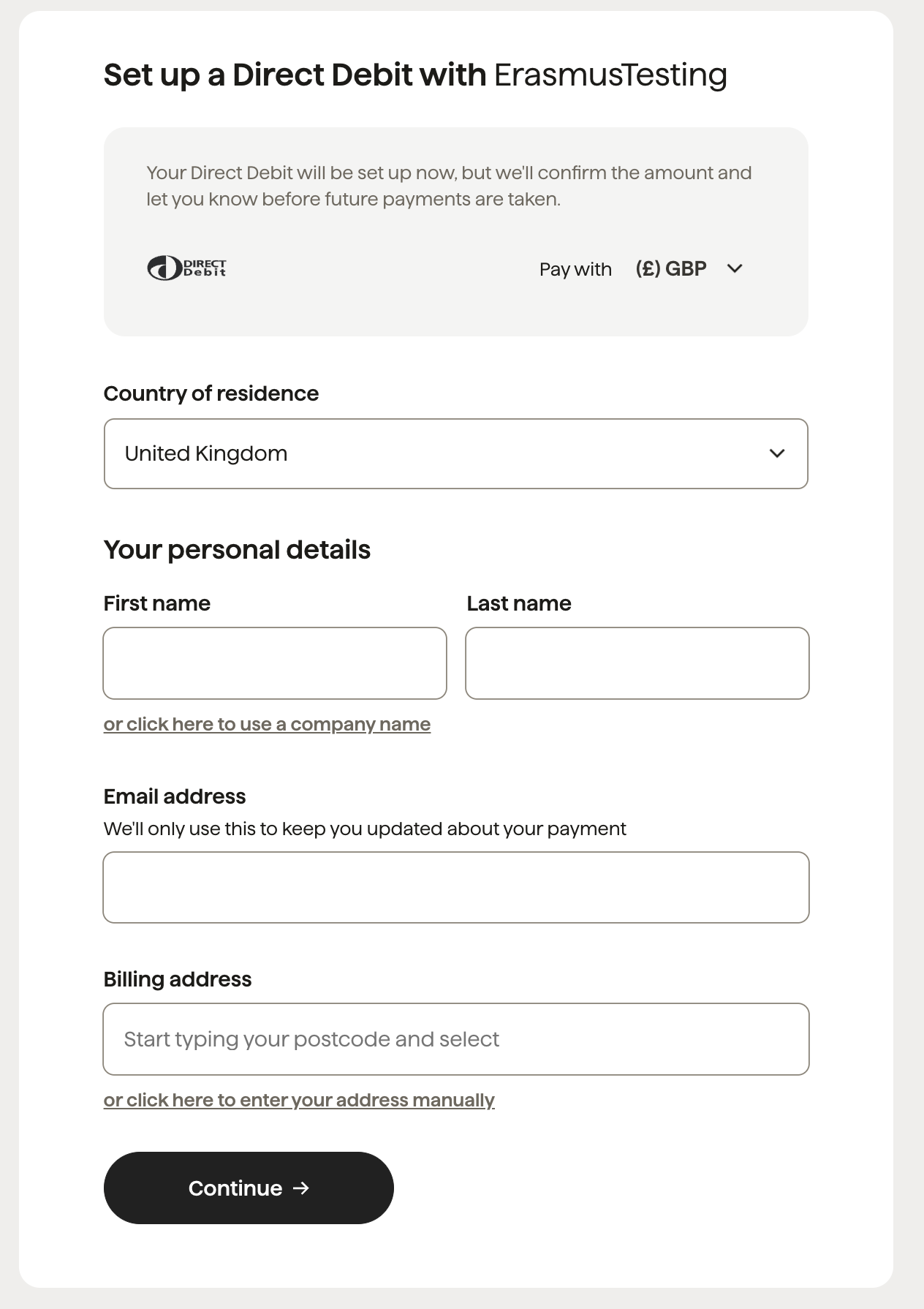
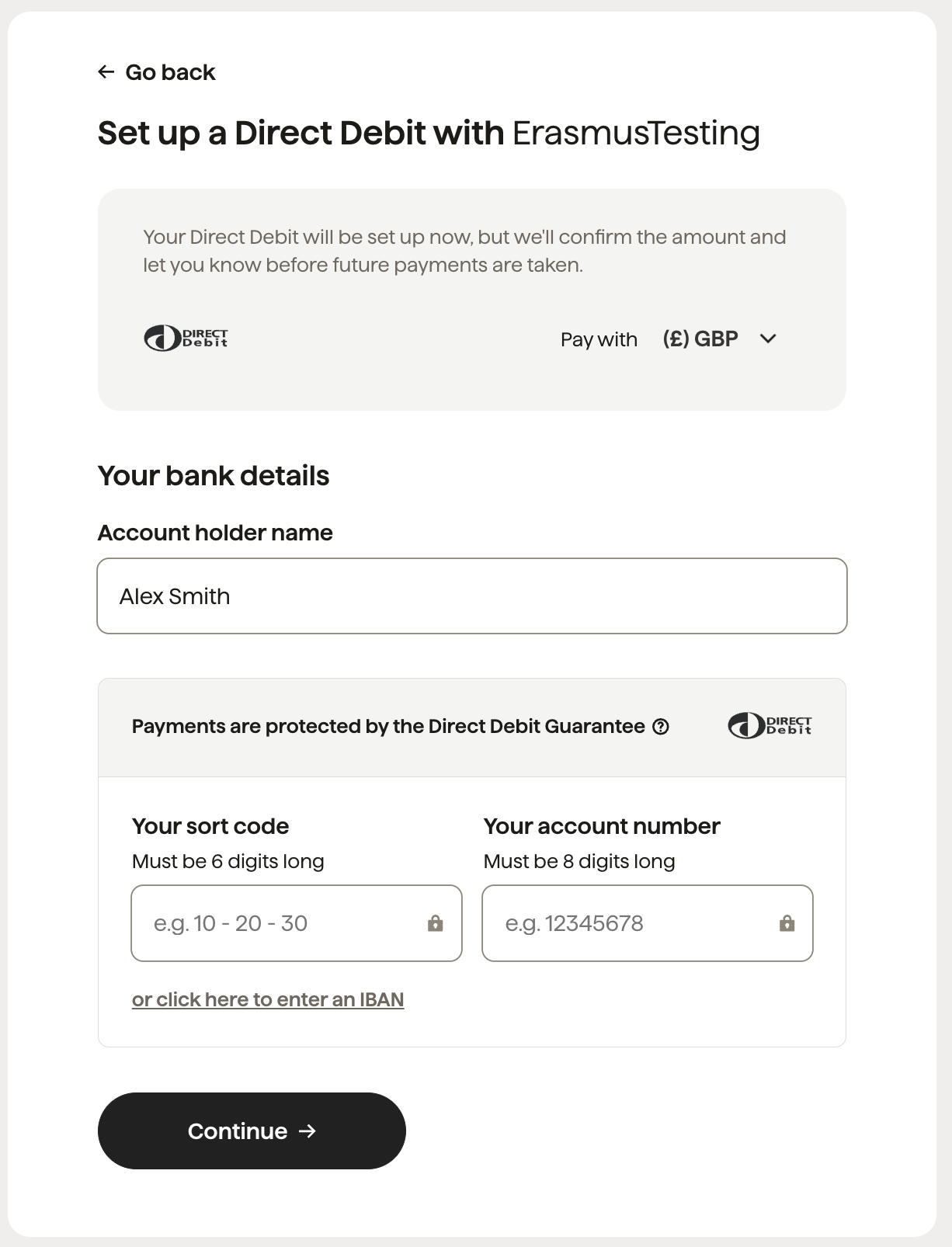
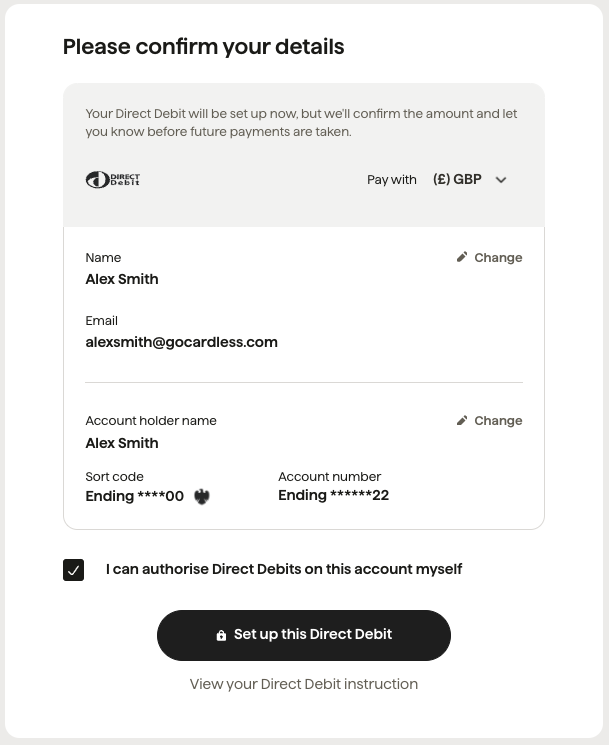
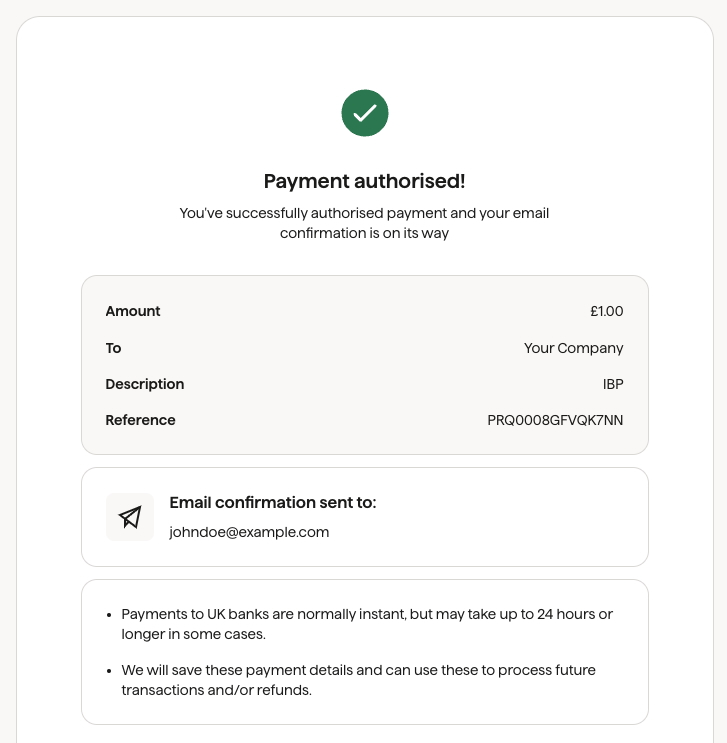
What the customer will see#
Customer fills in their personal details Collect customer details in order to complete the billing request.
Note: this screen is skipped if the details already exist, or the customer details have been locked.
Customer provides their bank details Provide the Bank account details in order for GC to setup mandate.
Note: this screen is skipped if the details already exist or the bank account is locked.
Customer confirms their details Confirm your personal and bank details, before authorising the mandate.
Confirmed! View confirmation that the payment has been successful once the bank authorisation is complete.
What's next?#