Account Verification#
Early Access
Account Verification is in Early Access. It isn't included in any package by default. We enable it for individual merchants, and requests that use account_information_request return a validation error until we enable it for your account.
To use Account Verification, we need to enable two things for your account:
Account Verification and Encrypted Bank Details Access.
Contact us
to request access.
What is Account Verification?#
Account Verification lets you confirm that an customer has access to
a bank account, using open banking. The customer authorises the connection
with their bank using Strong Customer Authentication the same secure
check they use to log in to their banking app. We then return the verified
account details to you.
Account Verification is a standalone Billing Request feature. It doesn't depend
on a payment or a mandate, so you can verify an customer's bank account
without setting up a Direct Debit. You can embed it at any point in your
customer journey.
Account Verification uses Open Banking Account Information Services (AIS): with the account
holder's one-off consent, we read their account details from their bank and
share them with you.
Integration options: Account Verification works with Hosted Pages and Custom
pages. This guide shows both flows.
Availability: United Kingdom (GB), Germany (DE) and France (FR)
What you get#
When the customer completes the flow, you get:
Proof that the customer has access to the bank account
The account details returned by the bank. Returned fields vary by institution
and country
Detail Description Retrieved from Customer name The full name of the customer Customer bank account Account number The complete account number Bank account details (encrypted)Sort code The account's sort code Bank account details (encrypted)IBAN The account's IBAN Bank account details (encrypted)Bank name The name of the customer's bank Customer bank account Country code The country the account is held in Customer bank account Currency The currency of the account Customer bank account
See Retrieve the verified bank account details
for both requests.
After the customer gives their one-off consent, we securely store
encrypted account details so you can retrieve them through the API when you need
them.
Before you start#
Set up a public key and note its ID. You need it to retrieve account details. See
Bank Details Access .
How it works#
Create a Billing Request with an account_information_request.
Create a Billing Request Flow and send the customer to the
authorisation_url.
Customer selects their bank, confirms what data we'll access, and
authorises with their bank.
The account is verified and the Billing Request is fulfilled.
Listen for a webhook, then retrieve the verified account details.
Step-by-step guide#
Create a Billing Request#
Create a Billing Request with the account_information_request.
It sits alongside mandate_request and payment_request and defines what you're verifying.
Parameter Type Description scopesarray Set to ["account_verification"]. country_codestring The country of the customer's bank: GB, DE or FR.
Bash PHP Python Ruby Java JavaScript .NET Go
curl -X POST https://api.gocardless.com/billing_requests \
  -H "Authorization: Bearer YOUR_ACCESS_TOKEN" \
  -H "GoCardless-Version: 2015-07-06" \
  -H "Content-Type: application/json" \
  -d '{
    "billing_requests": {
      "account_information_request": {
        "scopes": ["account_verification"],
        "country_code": "GB"
      }
    }
  }'
$billingRequest = $client -> billingRequests () -> create ([ "params" => [ "account_information_request" => [ "scopes" => [ "account_verification" ], "country_code" => "GB" ] ] ]); billing_request = client.billing_requests.create( params = { "account_information_request" : { "scopes" : [ "account_verification" ], "country_code" : "GB" } }) billing_request = @client. billing_requests . create ( params: { account_information_request: { scopes: [ "account_verification" ], country_code: "GB" } } ) BillingRequest billingRequest = client. billingRequests (). create () . withAccountInformationRequestScopes (Arrays. asList ( "account_verification" )) . withAccountInformationRequestCountryCode ( "GB" ) . execute (); const billingRequest = await client.billingRequests. create ({ account_information_request: { scopes: [ "account_verification" ], country_code: "GB" , }, }); var resp = await gocardless.BillingRequests. CreateAsync ( new GoCardless . Services . BillingRequestCreateRequest { AccountInformationRequest = new GoCardless . Services . BillingRequestCreateRequest . BillingRequestAccountInformationRequest { Scopes = new [] { "account_verification" }, CountryCode = "GB" } } ); GoCardless . Resources . BillingRequest billingRequest = resp.BillingRequest; billingRequestCreateParams := gocardless . BillingRequestCreateParams { AccountInformationRequest: & gocardless . BillingRequestCreateParamsAccountInformationRequest { Scopes: [] string { "account_verification" }, CountryCode: "GB" , }, } billingRequest, err := client.BillingRequests. Create (ctx, billingRequestCreateParams) Response:
{ "billing_requests" : { "id" : "BRQ123" , "status" : "pending" , "mandate_request" : null , "payment_request" : null , "auto_fulfil" : true , "account_information_request" : { "country_code" : "GB" , "scopes" : [ "account_verification" ] }, "links" : { "customer" : "CU123" , "customer_billing_detail" : "CBD123" , "creditor" : "CR123" , "organisation" : "OR123" , "account_information_request" : "AIR123" }, "actions" : [ { "type" : "select_institution" , "required" : true , "status" : "pending" }, { "type" : "collect_bank_account" , "required" : true , "status" : "pending" , "requires_actions" : [ "bank_authorisation" ] }, { "type" : "bank_authorisation" , "required" : true , "status" : "pending" , "requires_actions" : [ "select_institution" ] } ] } } Hosted Pages#
Create a Billing Request Flow#
Create a Billing Request Flow for the Billing Request. The response includes the
authorisation_url where the customer completes verification. To send the
customer back to your site afterwards, also set a redirect_uri.
Response:
{ "billing_request_flows" : { "id" : "BRF123" , "auto_fulfil" : true , "authorisation_url" : "https://pay.gocardless.com/billing/static/flow?id=BRF123" , "redirect_uri" : null , "exit_uri" : null , "skip_success_screen" : false , "expires_at" : "2026-07-16T14:23:50.601Z" , "links" : { "billing_request" : "BRQ123" } } } Send the customer to the flow#
Redirect the customer to the authorisation_url. They complete these
steps:
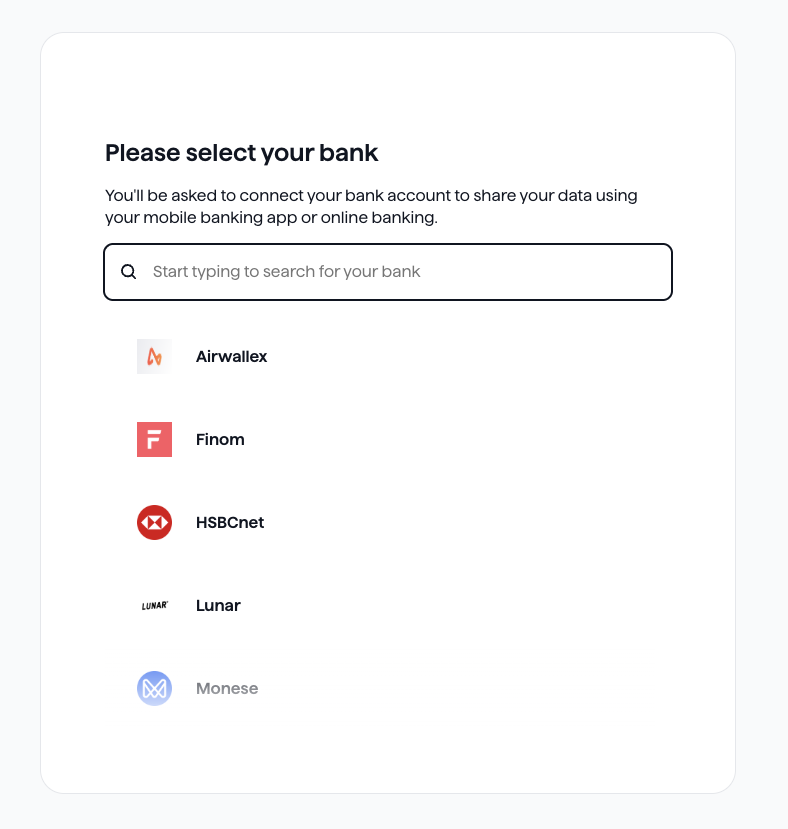
Select their bank.
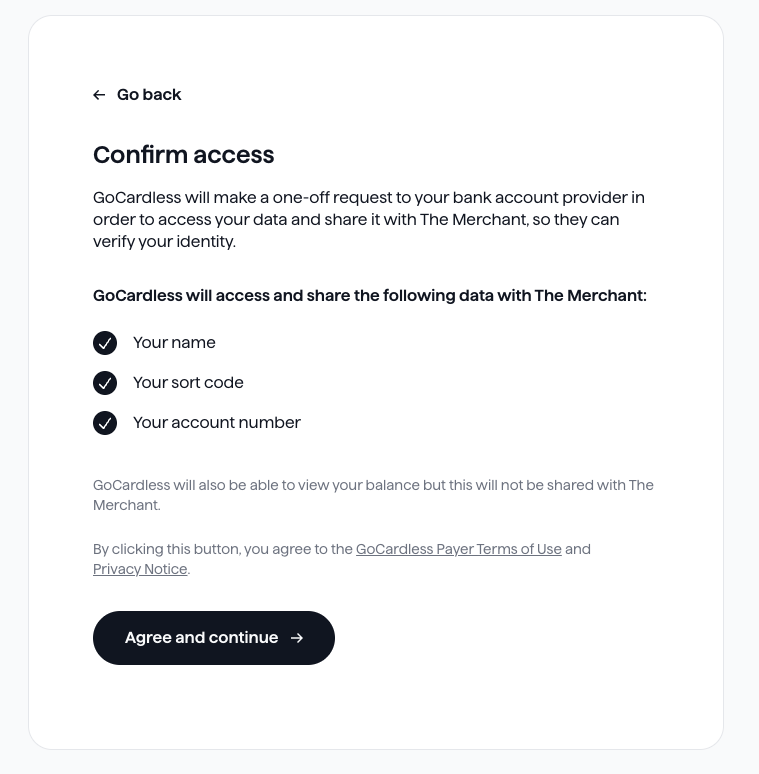
Confirm access. The customer sees the AIS consent screen. It lists
the data we'll access and share with you: their name, sort code and account
number. We can also view their balance, but we don't share it with you.
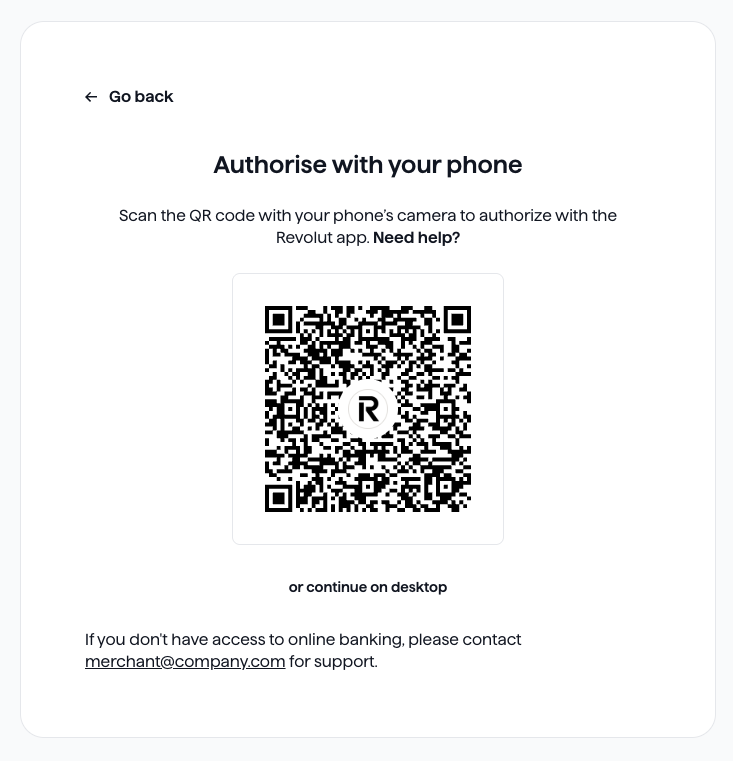
Connect to their bank. The customer completes bank authorisation
through a redirect or by scanning a QR code with their phone.
Authorise with their bank. The customer approves the request in
their bank's app or online banking.
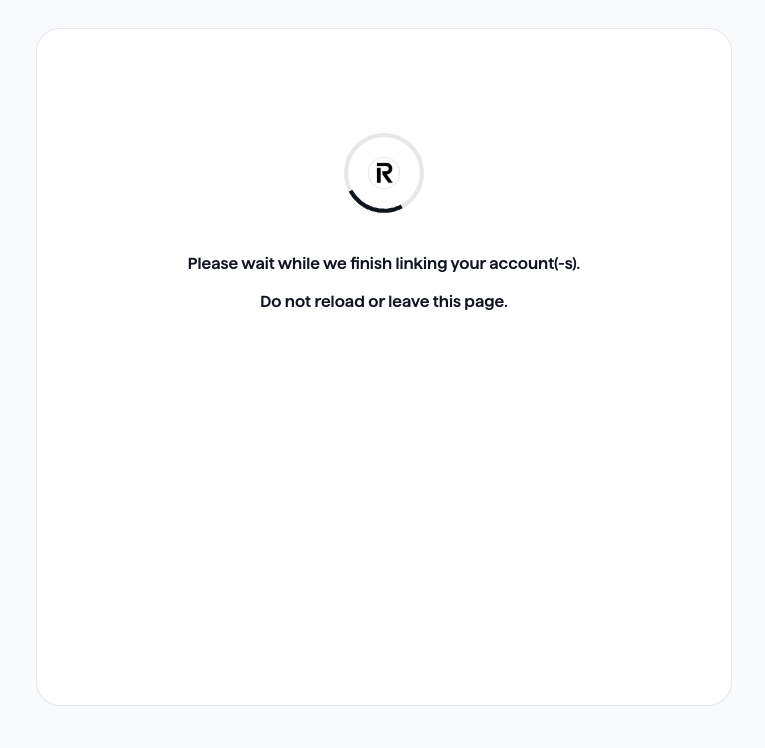
Wait while we link the account. The customer sees a loading screen.
Ask them not to reload or leave the page.
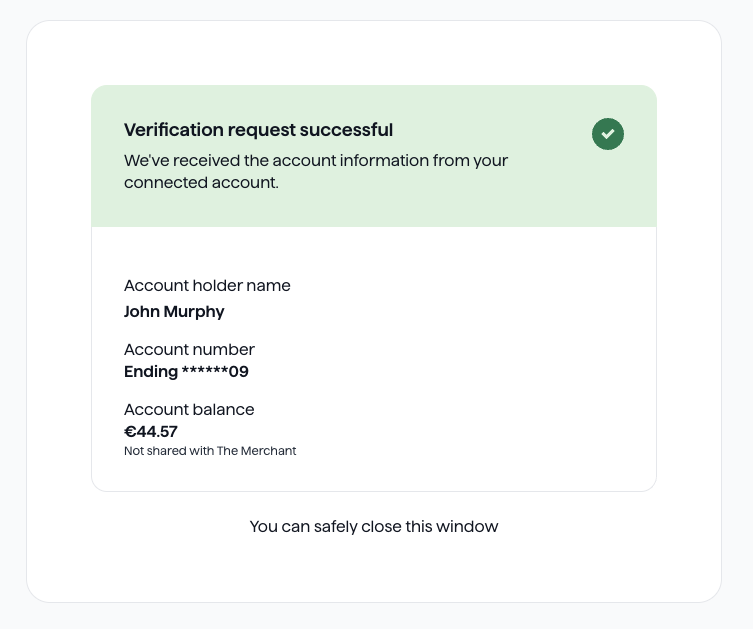
See the result. The success screen confirms the verification and shows
the account details we retrieved. If you set a redirect_uri, we then send the
customer back to that URL so they can carry on with your customer journey.
Customer Pages#
With Customer Pages, you build the screens and call the API for each step. For
the general pattern, see
Custom Payment Pages .
Select institution#
Identify the customer's bank. Use the
list institutions endpoint to show a bank
picker, then pass the chosen institution ID and its country_code.
Bash PHP Python Ruby Java JavaScript .NET Go
curl -X POST https://api.gocardless.com/billing_requests/BRQ123/actions/select_institution \
  -H "Authorization: Bearer YOUR_ACCESS_TOKEN" \
  -H "GoCardless-Version: 2015-07-06" \
  -H "Content-Type: application/json" \
  -d '{
    "data": {
      "institution": "REVOLUT_REVODEB2XXX",
      "country_code": "GB"
    }
  }'
$billingRequest = $client -> billingRequests () -> selectInstitution ( "BRQ123" , [ "params" => [ "institution" => "REVOLUT_REVODEB2XXX" , "country_code" => "GB" ] ]); billing_request = client.billing_requests.select_institution( "BRQ123" , params = { "institution" : "REVOLUT_REVODEB2XXX" , "country_code" : "GB" }) billing_request = @client. billing_requests . select_institution ( "BRQ123" , params: { institution: "REVOLUT_REVODEB2XXX" , country_code: "GB" } ) BillingRequest billingRequest = client. billingRequests (). selectInstitution ( "BRQ123" ) . withInstitution ( "REVOLUT_REVODEB2XXX" ) . withCountryCode ( "GB" ) . execute (); const billingRequest = await client.billingRequests. selectInstitution ( "BRQ123" , { institution: "REVOLUT_REVODEB2XXX" , country_code: "GB" , }); var resp = await gocardless.BillingRequests. SelectInstitutionAsync ( "BRQ123" , new GoCardless . Services . BillingRequestSelectInstitutionRequest { Institution = "REVOLUT_REVODEB2XXX" , CountryCode = "GB" } ); GoCardless . Resources . BillingRequest billingRequest = resp.BillingRequest; billingRequestSelectInstitutionParams := gocardless . BillingRequestSelectInstitutionParams { Institution: "REVOLUT_REVODEB2XXX" , CountryCode: "GB" , } billingRequest, err := client.BillingRequests. SelectInstitution (ctx, "BRQ123" , billingRequestSelectInstitutionParams) Response:
{ "billing_requests" : { "id" : "BRQ123" , "status" : "pending" , "actions" : [ { "type" : "select_institution" , "required" : true , "status" : "completed" }, { "type" : "collect_bank_account" , "required" : true , "status" : "pending" , "requires_actions" : [ "bank_authorisation" ] }, { "type" : "bank_authorisation" , "required" : true , "status" : "pending" , "requires_actions" : [ "select_institution" ] } ] } } The response is trimmed to the fields that change. You don't need to call
collect_bank_account yourself. We complete it automatically once the bank
authorisation succeeds.
Show a consent screen#
Before you send the customer to their bank, you must show your own consent
screen. It must tell them which data we'll access:
We access and share their name, sort code and account number with you
We can also view their balance, but we don't share it with you
Only create the bank authorisation after the customer agrees. See
Custom Payment Pages
for guidance on building your own screens.
Create a bank authorisation#
Bash PHP Python Ruby Java JavaScript .NET Go
curl -X POST https://api.gocardless.com/bank_authorisations \
  -H "Authorization: Bearer YOUR_ACCESS_TOKEN" \
  -H "GoCardless-Version: 2015-07-06" \
  -H "Content-Type: application/json" \
  -d '{
    "bank_authorisations": {
      "redirect_uri": "https://yoursite.com/verification-complete",
      "links": { "billing_request": "BRQ123" }
    }
  }'
$bankAuthorisation = $client -> bankAuthorisations () -> create ([ "params" => [ "redirect_uri" => "https://yoursite.com/verification-complete" , "links" => [ "billing_request" => "BRQ123" ] ] ]); bank_authorisation = client.bank_authorisations.create( params = { "redirect_uri" : "https://yoursite.com/verification-complete" , "links" : { "billing_request" : "BRQ123" } }) bank_authorisation = @client. bank_authorisations . create ( params: { redirect_uri: "https://yoursite.com/verification-complete" , links: { billing_request: "BRQ123" } } ) BankAuthorisation bankAuthorisation = client. bankAuthorisations (). create () . withRedirectUri ( "https://yoursite.com/verification-complete" ) . withLinksBillingRequest ( "BRQ123" ) . execute (); const bankAuthorisation = await client.bankAuthorisations. create ({ redirect_uri: "https://yoursite.com/verification-complete" , links: { billing_request: "BRQ123" , }, }); var resp = await gocardless.BankAuthorisations. CreateAsync ( new GoCardless . Services . BankAuthorisationCreateRequest { RedirectUri = "https://yoursite.com/verification-complete" , Links = new GoCardless . Services . BankAuthorisationCreateRequest . BankAuthorisationLinks { BillingRequest = "BRQ123" } } ); GoCardless . Resources . BankAuthorisation bankAuthorisation = resp.BankAuthorisation; bankAuthorisationCreateParams := gocardless . BankAuthorisationCreateParams { RedirectUri: "https://yoursite.com/verification-complete" , Links: gocardless . BankAuthorisationCreateParamsLinks { BillingRequest: "BRQ123" , }, } bankAuthorisation, err := client.BankAuthorisations. Create (ctx, bankAuthorisationCreateParams) Response:
{ "bank_authorisations" : { "id" : "BAU123" , "url" : "https://pay.gocardless.com/obauth/BAU123" , "redirect_uri" : "https://yoursite.com/verification-complete" , "expires_at" : "2026-07-16T14:38:50.000Z" , "links" : { "billing_request" : "BRQ123" } } } Redirect the customer to their bank#
Redirect the customer to the url from the bank authorisation response.
They verify the account in their banking app, then return to your
redirect_uri.
Don't use the redirect to confirm the outcome. Always use webhooks.
Listen for webhooks#
Account Verification uses the same webhooks
as other Billing Requests. Listen for these events to know when the account
holder has finished or if something went wrong:
Event Meaning billing_request_fulfilledThe customer completed the flow and the account is verified billing_request_bank_authorisation_deniedThe customer rejected the authorisation at their bank billing_request_bank_authorisation_expiredThe bank authorisation expired before it was completed billing_request_bank_authorisation_failedThe bank authorisation failed billing_request_flow_exitedThe customer left the flow before completing it
The customer can return to the flow and try again after a denied, expired
or failed authorisation. See
Billing Request events
for the full list and example payloads.
Check the Billing Request#
Once fulfilled, get the Billing Request
to find the customer_bank_account ID. The links.billing_request field on the
webhook event gives you the Billing Request ID.
Response:
{ "billing_requests" : { "id" : "BRQ123" , "status" : "fulfilled" , "mandate_request" : null , "payment_request" : null , "account_information_request" : { "country_code" : "GB" , "scopes" : [ "account_verification" ] }, "links" : { "customer" : "CU123" , "customer_billing_detail" : "CBD123" , "customer_bank_account" : "BA123" , "bank_authorisation" : "BAU123" , "creditor" : "CR123" , "organisation" : "OR123" , "account_information_request" : "AIR123" }, "actions" : [], "resources" : { "customer_bank_account" : { "id" : "BA123" , "account_number_ending" : "11" , "branch_code_ending" : "00" , "account_holder_name" : "JOHN MURPHY" , "bank_name" : "REVOLUT BANK UAB (PAYMENTS)" , "currency" : "GBP" , "country_code" : "GB" , "enabled" : true , "links" : { "customer" : "CU123" } } } } } Compared with a Billing Request for a mandate or payment:
The customer and customer_billing_detail records exist but have no
personal details
The only populated resource is the customer_bank_account, which holds the
details retrieved through Account Verification
We don't create a Direct Debit mandate
Retrieve the verified bank account details#
Use the customer_bank_account ID from the Billing Request to get the full
account details. The /bank_account_details endpoint returns the account
number, sort code or IBAN in an encrypted format. Pass the ID of your public
key in the GC-Key-Id header.
See Bank Details Access for the request
and how to decrypt the response.
Bash PHP Python Ruby Java JavaScript .NET Go
curl https://api.gocardless.com/bank_account_details/BA123 \
  -H "Authorization: Bearer YOUR_ACCESS_TOKEN" \
  -H "GoCardless-Version: 2015-07-06" \
  -H "GC-Key-Id: YOUR_PUBLIC_KEY_ID"
$bankAccountDetail = $client -> bankAccountDetails () -> get ( "BA123" , [ "headers" => [ "GC-Key-Id" => "YOUR_PUBLIC_KEY_ID" ] ]); bank_account_detail = client.bank_account_details.get( "BA123" , headers = { "GC-Key-Id" : "YOUR_PUBLIC_KEY_ID" } ) bank_account_detail = @client. bank_account_details . get ( "BA123" , headers: { "GC-Key-Id" => "YOUR_PUBLIC_KEY_ID" } ) BankAccountDetail bankAccountDetail = client. bankAccountDetails (). get ( "BA123" ) . withHeader ( "GC-Key-Id" , "YOUR_PUBLIC_KEY_ID" ) . execute (); const bankAccountDetail = await client.bankAccountDetails. find ( "BA123" , { "GC-Key-Id" : "YOUR_PUBLIC_KEY_ID" , }); var requestSettings = new GoCardless . Internals . RequestSettings { CustomiseRequestMessage = ( request ) => { request.Headers. Add ( "GC-Key-Id" , "YOUR_PUBLIC_KEY_ID" ); }, }; var resp = await gocardless.BankAccountDetails. GetAsync ( "BA123" , null , requestSettings); GoCardless . Resources . BankAccountDetail bankAccountDetail = resp.BankAccountDetail; bankAccountDetail, err := client.BankAccountDetails. Get ( ctx, "BA123" , gocardless . BankAccountDetailGetParams {}, gocardless. WithHeaders ( map [ string ] string { "GC-Key-Id" : "YOUR_PUBLIC_KEY_ID" }), ) Response:
{ "bank_account_details" : { "protected" : "eyJhbGciOiJSU0EtT0FFUCIsImVuYyI6IkEyNTZHQ00i..." , "encrypted_key" : "SxZUJQdcPyOUNkXFDWBO1kiUDfzEMyEk..." , "iv" : "Wv3uwtZia7n3Z0V1" , "ciphertext" : "jsgdMV-TB9i0RFlUh8ZM-E4BCez5yYIyzGlEQgibO8BI" , "tag" : "fneQ0sy2SlpLWmrAM809hw" } } To get the other account data, such as the customer name, currency and
country code, use the customer bank accounts endpoint.
Response:
{ "customer_bank_accounts" : { "id" : "BA123" , "created_at" : "2026-07-16T14:10:12.000Z" , "account_number_ending" : "11" , "account_holder_name" : "JOHN MURPHY" , "account_type" : null , "country_code" : "GB" , "currency" : "GBP" , "bank_name" : "REVOLUT BANK UAB (PAYMENTS)" , "metadata" : {}, "enabled" : true , "links" : { "customer" : "CU123" } } } Reuse verified details in a mandate flow#
After Account Verification, you hold a customer record with no personal details
and a verified customer_bank_account. When the customer later needs a
Direct Debit mandate, you can reuse both records. They don't have to enter or
verify their bank details again. This works with Hosted Pages and Customer Pages.
Create a Billing Request#
Specify the IDs of the customer and customer_bank_account from the
previously completed Account Verification Billing Request.
Bash PHP Python Ruby Java JavaScript .NET Go
curl -X POST https://api.gocardless.com/billing_requests \
  -H "Authorization: Bearer YOUR_ACCESS_TOKEN" \
  -H "GoCardless-Version: 2015-07-06" \
  -H "Content-Type: application/json" \
  -d '{
    "billing_requests": {
      "mandate_request": {
        "currency": "GBP"
      },
      "links": {
        "customer": "CU01MGFMG6KGPYTC7CYFHYCMCMCY",
        "customer_bank_account": "BA123"
      }
    }
  }'
$billingRequest = $client -> billingRequests () -> create ([ "params" => [ "mandate_request" => [ "currency" => "GBP" ], "links" => [ "customer" => "CU01MGFMG6KGPYTC7CYFHYCMCMCY" , "customer_bank_account" => "BA123" ] ] ]); billing_request = client.billing_requests.create( params = { "mandate_request" : { "currency" : "GBP" }, "links" : { "customer" : "CU01MGFMG6KGPYTC7CYFHYCMCMCY" , "customer_bank_account" : "BA123" } }) billing_request = @client. billing_requests . create ( params: { mandate_request: { currency: "GBP" }, links: { customer: "CU01MGFMG6KGPYTC7CYFHYCMCMCY" , customer_bank_account: "BA123" } } ) BillingRequest billingRequest = client. billingRequests (). create () . withMandateRequestCurrency ( "GBP" ) . withLinksCustomer ( "CU01MGFMG6KGPYTC7CYFHYCMCMCY" ) . withLinksCustomerBankAccount ( "BA123" ) . execute (); const billingRequest = await client.billingRequests. create ({ mandate_request: { currency: "GBP" , }, links: { customer: "CU01MGFMG6KGPYTC7CYFHYCMCMCY" , customer_bank_account: "BA123" , }, }); var resp = await gocardless.BillingRequests. CreateAsync ( new GoCardless . Services . BillingRequestCreateRequest { MandateRequest = new GoCardless . Services . BillingRequestCreateRequest . BillingRequestMandateRequest { Currency = "GBP" }, Links = new GoCardless . Services . BillingRequestCreateRequest . BillingRequestLinks { Customer = "CU01MGFMG6KGPYTC7CYFHYCMCMCY" , CustomerBankAccount = "BA123" } } ); GoCardless . Resources . BillingRequest billingRequest = resp.BillingRequest; billingRequestCreateParams := gocardless . BillingRequestCreateParams { MandateRequest: & gocardless . BillingRequestCreateParamsMandateRequest { Currency: "GBP" , }, Links: & gocardless . BillingRequestCreateParamsLinks { Customer: "CU01MGFMG6KGPYTC7CYFHYCMCMCY" , CustomerBankAccount: "BA123" , }, } billingRequest, err := client.BillingRequests. Create (ctx, billingRequestCreateParams) The bank account is already collected, so you can skip the bank account step in
either flow.
Create a Billing Request Flow#
If you're using Hosted Pages, create a Billing Request Flow with
lock_bank_account set to true and lock_customer_details set to false. The
customer record has no personal details yet, so the customer needs to
provide them. If you already have their details from other sources, use the
prefilled_customer section. The customer can still edit those details.
Bash PHP Python Ruby Java JavaScript .NET Go
curl -X POST https://api.gocardless.com/billing_request_flows \
  -H "Authorization: Bearer YOUR_ACCESS_TOKEN" \
  -H "GoCardless-Version: 2015-07-06" \
  -H "Content-Type: application/json" \
  -d '{
    "billing_request_flows": {
      "redirect_uri": "https://my-company.com/landing",
      "exit_uri": "https://my-company.com/exit",
      "lock_bank_account": true,
      "lock_customer_details": false,
      "prefilled_customer": {
        "given_name": "Frank",
        "family_name": "Osborne",
        "email": "frank.osborne@acmeplc.com"
      },
      "links": {
        "billing_request": "BRQ123"
      }
    }
  }'
$billingRequestFlow = $client -> billingRequestFlows () -> create ([ "params" => [ "redirect_uri" => "https://my-company.com/landing" , "exit_uri" => "https://my-company.com/exit" , "lock_bank_account" => true , "lock_customer_details" => false , "prefilled_customer" => [ "given_name" => "Frank" , "family_name" => "Osborne" , "email" => "frank.osborne@acmeplc.com" ], "links" => [ "billing_request" => "BRQ123" ] ] ]); billing_request_flow = client.billing_request_flows.create( params = { "redirect_uri" : "https://my-company.com/landing" , "exit_uri" : "https://my-company.com/exit" , "lock_bank_account" : True , "lock_customer_details" : False , "prefilled_customer" : { "given_name" : "Frank" , "family_name" : "Osborne" , "email" : "frank.osborne@acmeplc.com" }, "links" : { "billing_request" : "BRQ123" } }) billing_request_flow = @client. billing_request_flows . create ( params: { redirect_uri: "https://my-company.com/landing" , exit_uri: "https://my-company.com/exit" , lock_bank_account: true , lock_customer_details: false , prefilled_customer: { given_name: "Frank" , family_name: "Osborne" , email: "frank.osborne@acmeplc.com" }, links: { billing_request: "BRQ123" } } ) BillingRequestFlow billingRequestFlow = client. billingRequestFlows (). create () . withRedirectUri ( "https://my-company.com/landing" ) . withExitUri ( "https://my-company.com/exit" ) . withLockBankAccount ( true ) . withLockCustomerDetails ( false ) . withPrefilledCustomerGivenName ( "Frank" ) . withPrefilledCustomerFamilyName ( "Osborne" ) . withPrefilledCustomerEmail ( "frank.osborne@acmeplc.com" ) . withLinksBillingRequest ( "BRQ123" ) . execute (); const billingRequestFlow = await client.billingRequestFlows. create ({ redirect_uri: "https://my-company.com/landing" , exit_uri: "https://my-company.com/exit" , lock_bank_account: true , lock_customer_details: false , prefilled_customer: { given_name: "Frank" , family_name: "Osborne" , email: "frank.osborne@acmeplc.com" , }, links: { billing_request: "BRQ123" , }, }); var resp = await gocardless.BillingRequestFlows. CreateAsync ( new GoCardless . Services . BillingRequestFlowCreateRequest { RedirectUri = "https://my-company.com/landing" , ExitUri = "https://my-company.com/exit" , LockBankAccount = true , LockCustomerDetails = false , PrefilledCustomer = new GoCardless . Services . BillingRequestFlowCreateRequest . BillingRequestFlowPrefilledCustomer { GivenName = "Frank" , FamilyName = "Osborne" , Email = "frank.osborne@acmeplc.com" }, Links = new GoCardless . Services . BillingRequestFlowCreateRequest . BillingRequestFlowLinks { BillingRequest = "BRQ123" } } ); GoCardless . Resources . BillingRequestFlow billingRequestFlow = resp.BillingRequestFlow; billingRequestFlowCreateParams := gocardless . BillingRequestFlowCreateParams { RedirectUri: "https://my-company.com/landing" , ExitUri: "https://my-company.com/exit" , LockBankAccount: true , LockCustomerDetails: false , PrefilledCustomer: & gocardless . BillingRequestFlowCreateParamsPrefilledCustomer { GivenName: "Frank" , FamilyName: "Osborne" , Email: "frank.osborne@acmeplc.com" , }, Links: gocardless . BillingRequestFlowCreateParamsLinks { BillingRequest: "BRQ123" , }, } billingRequestFlow, err := client.BillingRequestFlows. Create (ctx, billingRequestFlowCreateParams) The rest of the flow works the same as any other mandate. See
Setting up Mandates .
What's next#