
Webhooks for partners#
A webhook is a real-time request that GoCardless sends to your server to alert you of an event.
Adding support for webhooks allows you to receive real-time notifications from GoCardless when events happen in your users' accounts, so you can take automated actions. This is the suggested monitoring approach.
A webhook can contain multiple events, and each has:
- A
resource_type, telling us what kind of resource the event is for, for example,paymentsormandates - An
action, telling us what happened to the resource, for example, thefailedaction for a payment details, specifying why the event happenedlinks, includinglinks.organisation, the ID of the user's GoCardless account the event belongs to
Handling webhooks at scale#
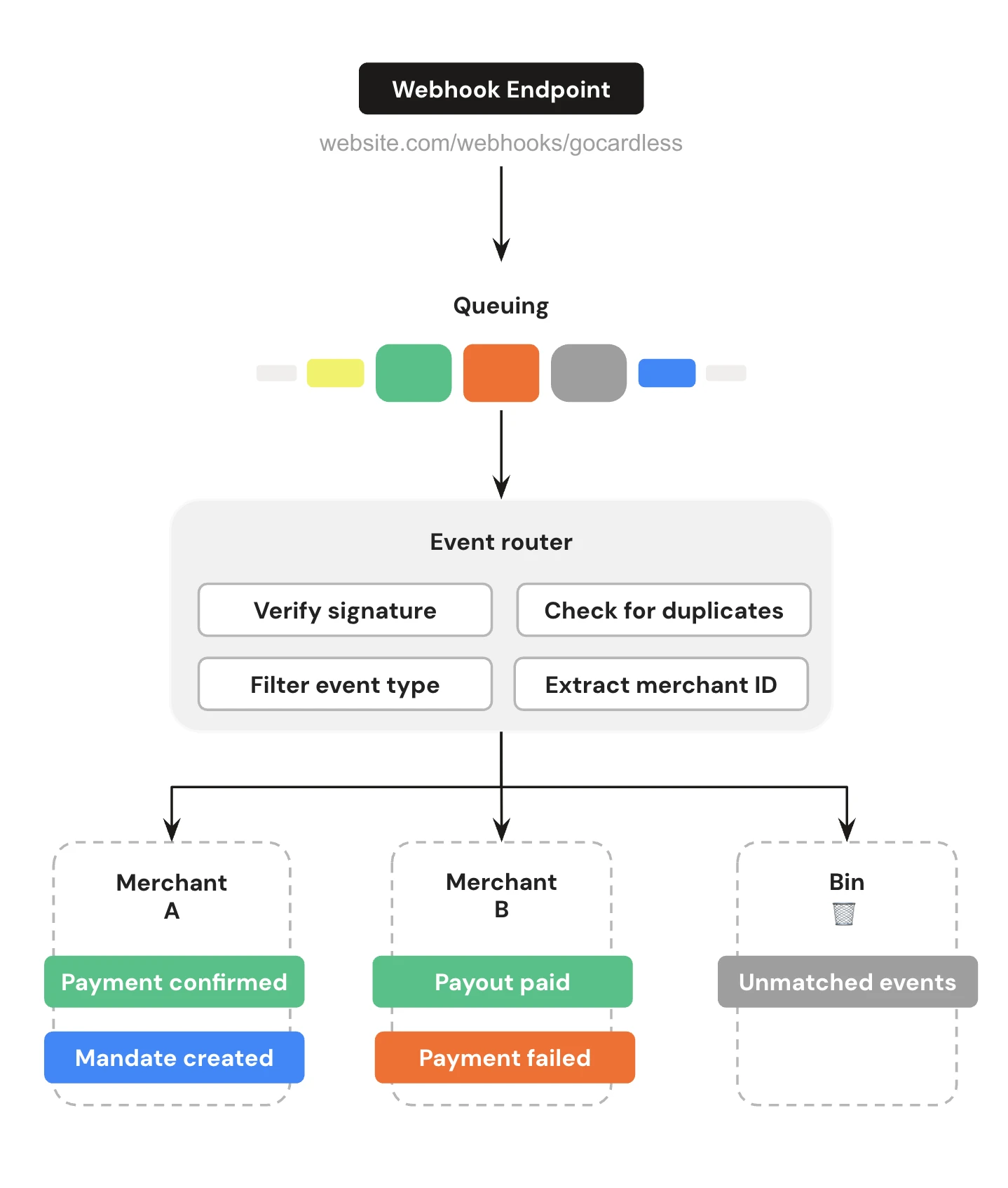
One webhook endpoint receives events for all of your users, and each webhook can contain up to 250 events. To handle them reliably:
- Queue incoming webhooks. Respond straight away, then process the events in the background
- Verify the signature in the
Webhook-Signatureheader, so you only act on webhooks from GoCardless. See secure your webhooks - Check for duplicates. The same event can arrive more than once, so skip event IDs you've already processed
- Filter by event type. Only handle the events your integration needs
- Route each event to the right user by matching
links.organisationto the organisation ID you stored when they connected their account. Log and discard any events you can't match - Handle events you didn't trigger. You also get events for mandates and payments your users create in the GoCardless dashboard, and for changes we or the banks make, like chargebacks. Don't fail when an event is for a resource you have no record of. Log it, and respond with a
2xxstatus so we don't retry it
Out-of-order and missed events#
Webhooks can arrive out of order. For example, a payment's confirmed event can arrive before its created event. Before you update a record, fetch the resource's current state from the API, rather than relying on the order events arrive in.
If your endpoint is down, we retry each webhook up to 8 times, at increasing intervals. To catch anything you still missed, list events for each connected user with created_at[gt] set to the time of the last event you processed. Do this after an outage, and on a regular schedule.
Key webhook events#
The descriptions follow the API, which calls the payer the customer.
Billing request webhooks#
| Event | Description | Suggested handling |
|---|---|---|
flow_visited | The billing request flow has been visited | Use to detect payer inactivity and expire the billing request if needed |
flow_exited | The payer exited the flow without completing it | Consider triggering a push notification for mobile experiences |
bank_authorisation_denied | A bank authorisation was denied by the payer | Display the denial reason from details.description |
bank_authorisation_failed | A bank authorisation failed due to a bank account mismatch | Display the failure reason from details.description |
fulfilled | The billing request was fulfilled and the mandate and/or payment have been created | Save links.mandate_request_mandate and/or links.payment_request_payment against your records |
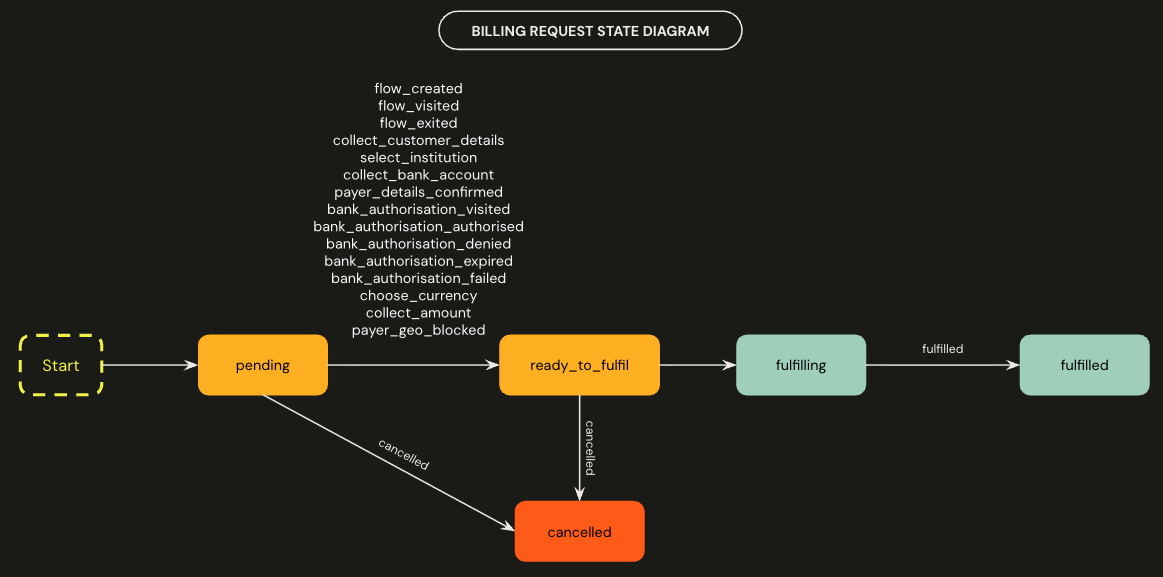
See the full list of billing request webhooks in the API reference.
Mandate webhooks#
| Event | Description | Suggested handling |
|---|---|---|
created | The mandate has been created | Save the mandate ID against your customer record |
submitted | The mandate has been submitted to the banks | Show the mandate as pending |
active | The mandate has been successfully set up by the customer's bank | Show the mandate as active |
failed | The mandate could not be set up — the bank account does not accept Direct Debit or is closed | Show the reason from details.description, and let your user ask the payer for another bank account or payment method |
cancelled | The mandate was cancelled by the customer, via the API, or automatically when their account was closed | Show the mandate as cancelled, and let your user ask the payer for a new mandate. We cancel its subscriptions, instalment schedules and pending payments automatically. |
expired | No collections were made within the dormancy period and the mandate has expired | Show the mandate as expired, and let your user reinstate it or ask for a new one. We cancel its subscriptions and instalment schedules automatically. |
resubmission_requested | A reinstate request was made via the mandate reinstate endpoint | Show the mandate as pending |
reinstated | The mandate has become active again after being cancelled or expired | Show the mandate as active |
replaced | The mandate was cancelled and replaced by a new one. The event includes links.new_mandate | Update the stored mandate ID to the value in links.new_mandate |
transferred | The mandate moved to a new bank account | Fetch the new bank account from links.new_customer_bank_account and update the bank details you show your user |
blocked | The mandate matched fraud information or a block list and cannot be unblocked | Show the mandate as blocked |
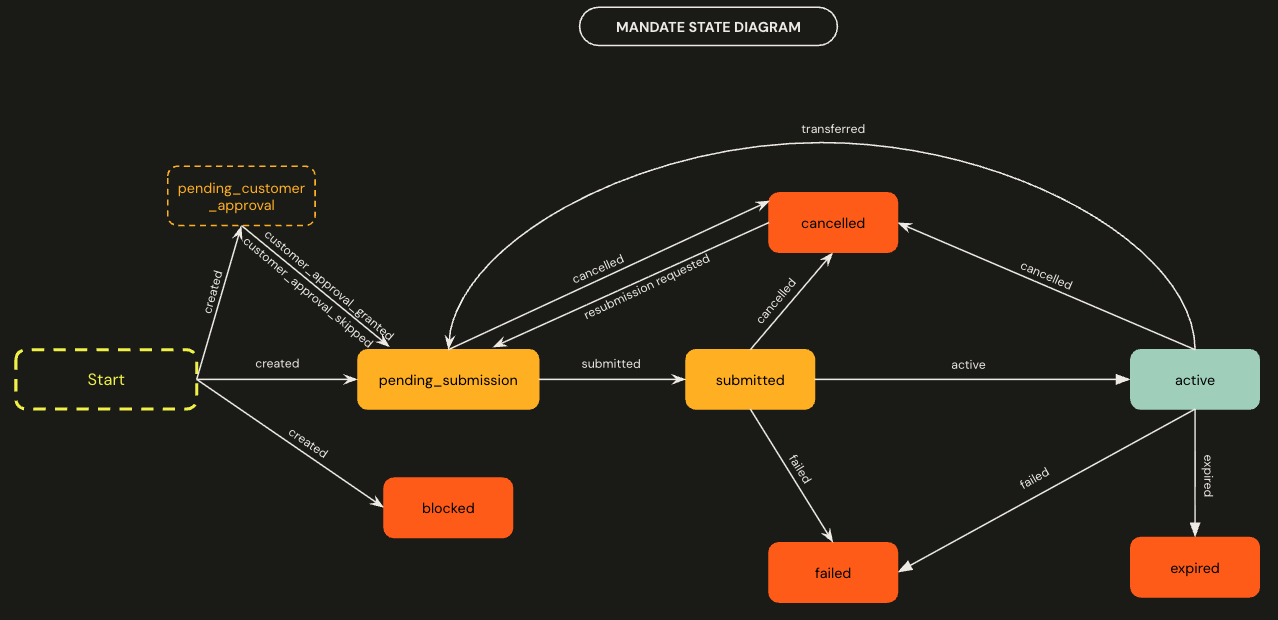
See the full list of mandate webhooks in the API reference.
Payment webhooks#
| Event | Description | Suggested handling |
|---|---|---|
created | The payment has been created | Save the payment ID against the record |
submitted | The payment has been submitted to the banks | Show the payment as pending |
confirmed | The payment has been collected and is held by GoCardless before payout | Mark the record as paid |
paid_out | The payment has been sent to the creditor's bank account | Mark the record as paid out and link it to its payout, using links.payout |
failed | The payment could not be collected. If will_attempt_retry is true, Success+ will retry automatically | If will_attempt_retry is true, show "Retry scheduled". Otherwise, show the reason, mark the record as unpaid, and let your user retry the payment |
cancelled | The payment was cancelled | Show the payment as cancelled, and mark the record as unpaid |
resubmission_requested | Success+ has scheduled an automatic retry (see failed) | Show "Retry scheduled" |
charged_back | The customer reclaimed the payment via the Direct Debit Guarantee | Mark the record as unpaid, and show the chargeback to your user |
chargeback_cancelled | The customer's bank cancelled the chargeback request | Mark the record as paid again |
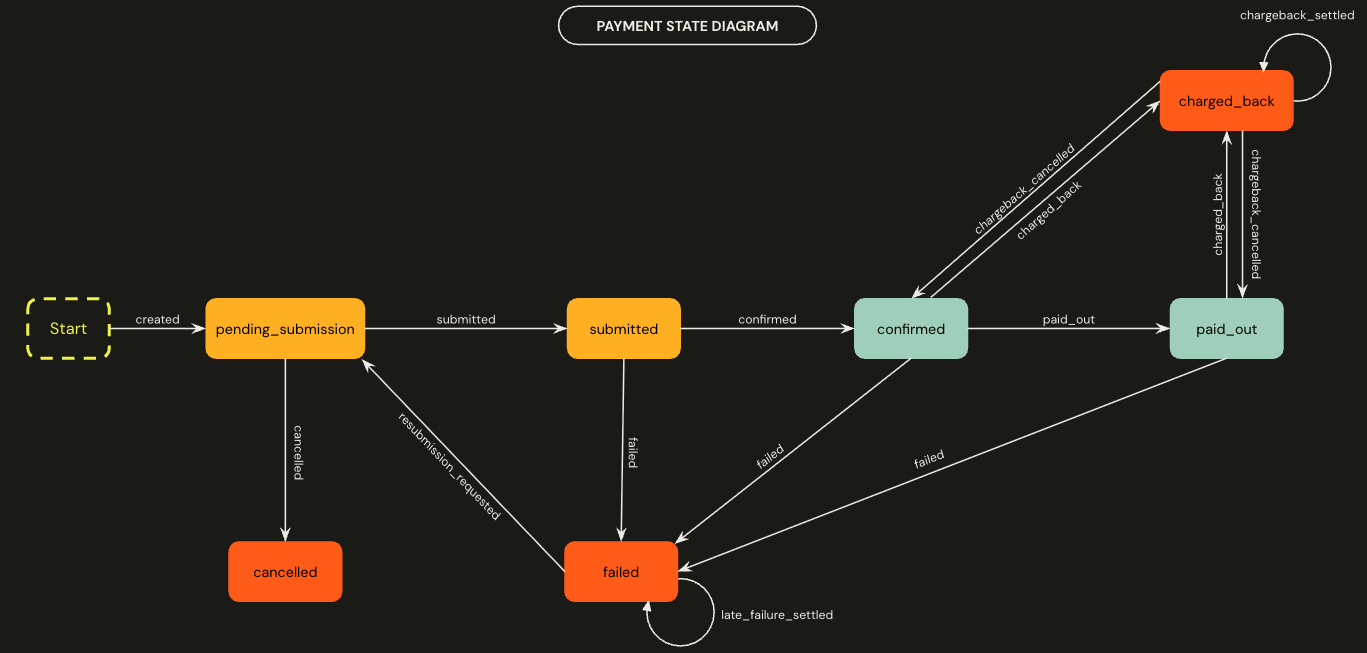
For what to show your user in each situation, see when payments go wrong. See the full list of payment webhooks in the API reference.
Refund webhooks#
| Event | Description | Suggested handling |
|---|---|---|
created | A refund has been created (details.cause: payment_refunded, details.origin: api) | Show the refund as pending next to the payment |
failed | The refund did not reach the customer; funds are returned to your user (details.cause: refund_failed) | Show the refund as failed, so your user can contact the payer |
paid | The refund has been paid to the customer (details.cause: refund_paid) | Show the refund as paid |
See the full list of refund webhooks in the API reference.
Disconnections#
Your user can revoke your access, or their GoCardless account can be closed. When this happens, we send you a final webhook, so you can clean up any data on your side. Your access token stops working, so you can't make any more API calls for that user. If you think the disconnection was a mistake, contact the user directly.
This webhook looks like other webhooks, wrapped in the events key, but there's no associated event, so the event id is null. You can identify it by its resource_type of organisations and action of disconnected.
For example, a handler for this webhook: