
Scenario Simulators#
When you're building an integration, there are common paths you should make sure your integration handles — for example, a customer cancelling their mandate or a payment failing due to insufficient funds.
In the sandbox environment, scenario simulators let you manually trigger these cases to test how your integration responds. They're available through the dashboard and the API.
Dashboard-triggered scenarios#
Dashboard-triggered scenarios are started from your Sandbox Dashboard. Head to the Developers tab → API Settings, open the Actions dropdown, and click Simulate scenario.
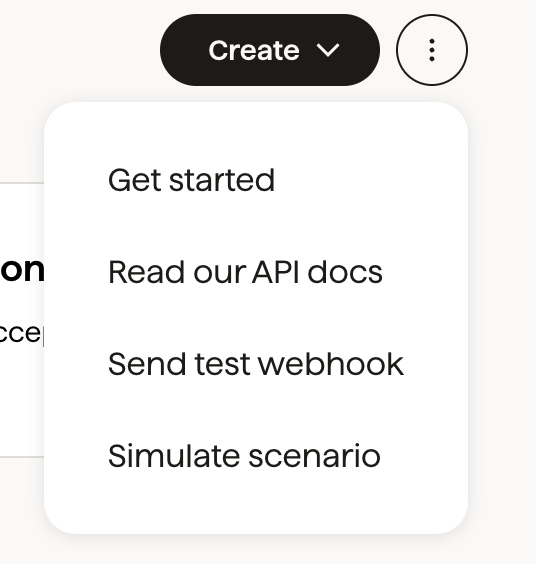
Choose a scenario from the dropdown. You'll see a description of what will happen and anything to be aware of — some simulators are incompatible with certain schemes.
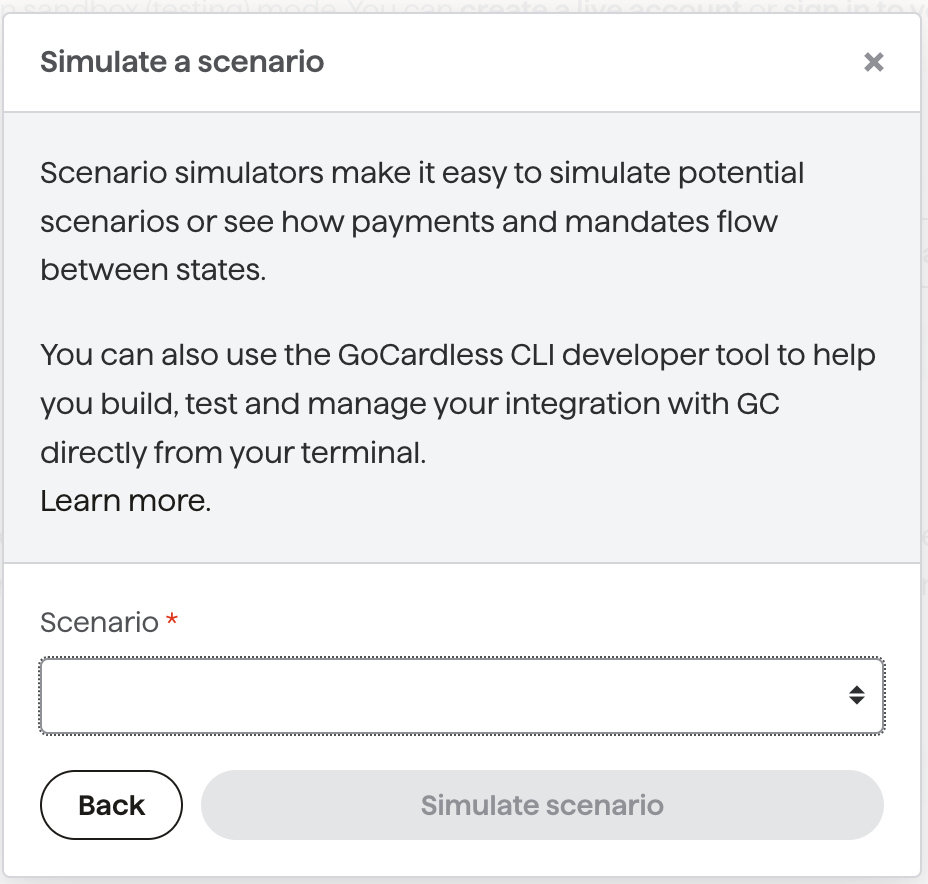
Enter the ID of the resource to simulate against, then click Simulate scenario. If the resource can't be found or isn't compatible with the chosen scenario, you'll see an error.
Dashboard-triggered scenarios support all name-triggered scenarios below, plus extras such as creditor verification status for partners.
API-triggered scenarios#
Trigger simulators via the API. See the scenario simulators API reference for details.
Name-triggered scenarios#
Name-triggered scenarios use special customer given_name values. For example, creating a customer named "Successful" activates their mandate immediately and pays out payments straight away. All relevant events and webhooks are sent.
given_name | Description | On mandate creation | On payment creation | Schemes |
|---|---|---|---|---|
Successful | Payment collected and paid out successfully. | submitted → activated | submitted → confirmed → paid_out (payout created) | ACH, Autogiro, Bacs, BECS, BECS NZ, Betalingsservice, PAD, SEPA Core |
Penniless | Payment fails (e.g. insufficient funds). | submitted → activated | submitted → failed | ACH, Autogiro, Bacs, BECS, BECS NZ, Betalingsservice, PAD, SEPA Core |
Fickle | Payment collected then charged back. | submitted → activated | submitted → confirmed → paid_out → charged_back | ACH, Autogiro, Bacs, BECS, BECS NZ, Betalingsservice, PAD, SEPA Core |
Late | Payment fails but the bank reports it later than normal. | submitted → activated | submitted → confirmed → failed | ACH, Bacs, BECS, BECS NZ, SEPA Core |
Invalid | Mandate fails because bank details are invalid. | submitted → failed | N/A | ACH, Autogiro, Bacs, BECS, BECS NZ, Betalingsservice, PAD |
Expired | Mandate expires after the scheme dormancy period (13 months Bacs, 15 months BECS/Betalingsservice, 3 years SEPA). | submitted → activated → expired | N/A | ACH, Bacs, BECS, BECS NZ, Betalingsservice, PAD, SEPA Core |
Switching | Bacs mandate transferred via the Current Account Switching Service. | submitted → active → transferred | N/A | Bacs only |
Instalment Schedules#
Instalment schedule states are simulated using a special customer given_name or a special schedule name:
Schedule name | Customer given_name | Description | Result |
|---|---|---|---|
| N/A | Successful | All payments collected successfully. | completed |
| N/A | Penniless | Payments cannot be collected. | errored |
Faily | N/A | Fails with: must be on or after mandate's next_possible_customer_charge_date | creation_failed |
Outbound Payments#
Simulate outbound payment outcomes by setting a specific description value at creation:
description | Description | Result |
|---|---|---|
failed_to_execute | Submission to the bank fails. | executing → failed |
failed_due_to_bank_rejection | Submission succeeds but is rejected by the recipient's bank. | executing → failed |
failed_due_to_bank_rejection_after_execution | Submitted and accepted, then later rejected. | executing → executed → failed |
| Any other value | Submission succeeds and is accepted. | executing → executed |
Payer Name Verification#
To simulate a No Match result in the Billing Request Flow, use these details at the collect_bank_account_details step:
country | account_holder_name | sort_code | account_number | iban |
|---|---|---|---|---|
GB | No Match | 200000 | 55779911 | |
FR | No Match | FR1420041010050500013M02606 | ||
DE | No Match | DE89370400440532013000 |
Confirmation of Payee (CoP) for Outbound Payments#
Simulate CoP results by creating bank accounts with specific account_holder_name values:
account_holder_name | sort_code | account_number | Result |
|---|---|---|---|
PARTIAL MATCH | 200000 | 55779911 | partial_match |
NO MATCH | 200000 | 55779911 | no_match |
UNABLE TO MATCH | 200000 | 55779911 | unable_to_match |
| Any other name | 200000 | 55779911 | full_match |